The VDI Reality Check: Medical vs. Retail vs. The Road
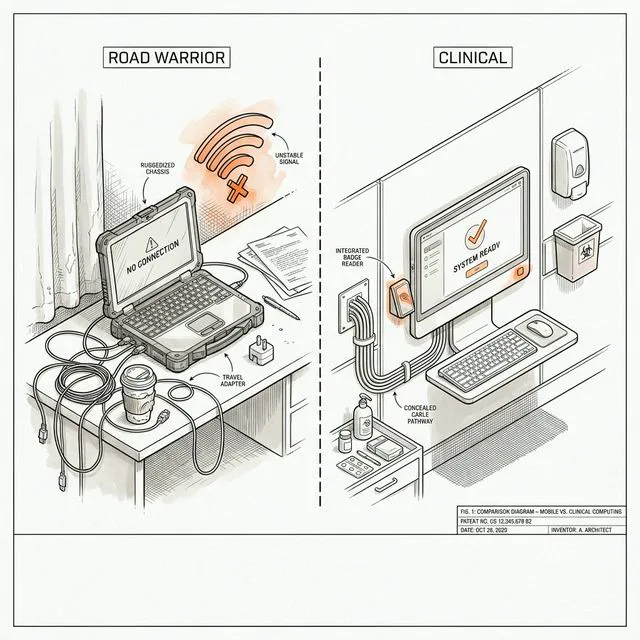
If you ask a virtualization vendor whether you should use VDI or physical "fat" clients, the answer is always VDI. If you ask a hardware vendor, the answer is always a new laptop.
Here is the honest answer: VDI is a specific tool for a specific set of constraints. Deploy it for the wrong use case and you are just trading "desktop support" tickets for "storage latency" tickets—and paying a premium for the privilege.
The Medical Context: Where VDI Is Actually King
In a clinical setting, seconds matter. If a nurse has to wait 2 minutes for Windows to load every time they move from Room 302 to Room 304, they will find a way to bypass your security.
The Verdict: VDI (usually) Wins.
- Why: The "Tap-and-Go" workflow. With VDI and a proximity badge reader (like Imprivata OneSign), a clinician taps their badge, and their desktop session appears in 5–10 seconds. Imprivata's benchmarks show this saves clinicians an average of 45 minutes per day.
- The Catch: You need rock-solid onsite networking—enterprise-grade Wi-Fi with proper controller-based roaming.
The Retail Floor: The "Dumb Terminal" vs. The iPad
Retail is brutal on hardware. Devices get dropped, spilled on, and used by high-turnover staff.
The Verdict: It's Complicated (but leaning toward Mobile/Fat Client).
- Modern POS software is often cloud-native (SaaS) or runs on iOS/Android. Using VDI to stream a Chrome browser is like renting a semi-truck to carry a sandwich.
- Where VDI stays: In the back office or for legacy ERP systems that absolutely require a heavy Windows client.
The Road Warrior: Where VDI Goes to Die
This is where we see the most money wasted. A company wants to "secure their data," so they force their sales team to use VDI for everything.
The Verdict: Fat Client (Laptop) Wins.
- The Physics Problem: VDI requires a constant, low-latency internet connection. Once latency exceeds 150ms, interactive tasks feel laggy. Above 300ms, the session is practically unusable.
- The "Offline" Reality: Field workers need to work on the plane. VDI has zero offline capability.
- The Better Way: A "Modern Managed" laptop with BitLocker encryption, remote wipe, OneDrive sync, and per-app VPN.
The Third Way: DaaS and Cloud PC
- Azure Virtual Desktop (AVD): Microsoft's first-party VDI in Azure. Multi-session Windows 11, FSLogix profile containers.
- Windows 365 Cloud PC: Fixed-price per-user cloud desktop that now supports offline mode (in preview).
Decision Framework
Don't start with the technology. Start with the constraints.
- Clinical/shift workers → VDI (roaming, badge-tap, shared workstations)
- Remote contractors/seasonal → DaaS (predictable OPEX, no on-prem hardware)
- Knowledge workers/field staff → Managed laptop (offline, low-latency, full capability)
Takeaway: VDI is a constraint management strategy, not a desktop strategy. Match the infrastructure to the user's physical reality.